01
Site-centric inventory
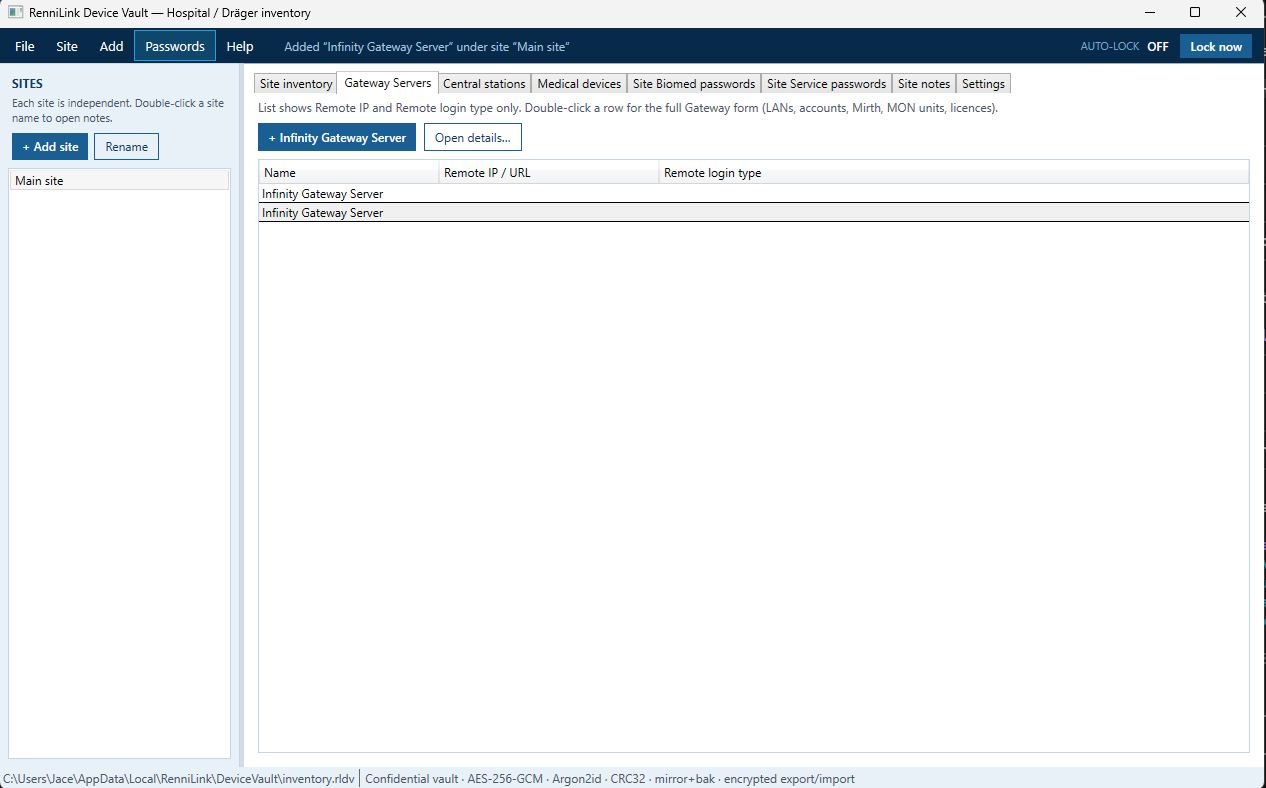
Independent hospital or campus sites. Each site holds its own servers, stations, medical device rows, Biomed/Service password lists, and notes — inventory stays scoped per site in the UI model.

RenniLink Device Vault is a Windows desktop vault for encrypted hospital and Dräger Infinity network inventory — sites, gateways, central stations, medical devices, and service credentials — with portable backup, dual shared passwords (admin edit / user view), multi-user file share access without SQL Server, and enterprise silent install for Intune and SCCM.
An exercise in secure medical inventory:
AES-256-GCM, Argon2id, dual password wraps, CRC-32, SHA-256 fingerprint,
secure encrypted export, and team share of one encrypted .rldv
on a file or cloud share.
.rldv · team share without SQL ·
not offered commercially.
Site-centric medical device inventory for clinical IT and biomedical teams — organised by site, encrypted as a native vault file, shareable on a file server or cloud folder.
Independent hospital or campus sites. Each site holds its own servers, stations, medical device rows, Biomed/Service password lists, and notes — inventory stays scoped per site in the UI model.
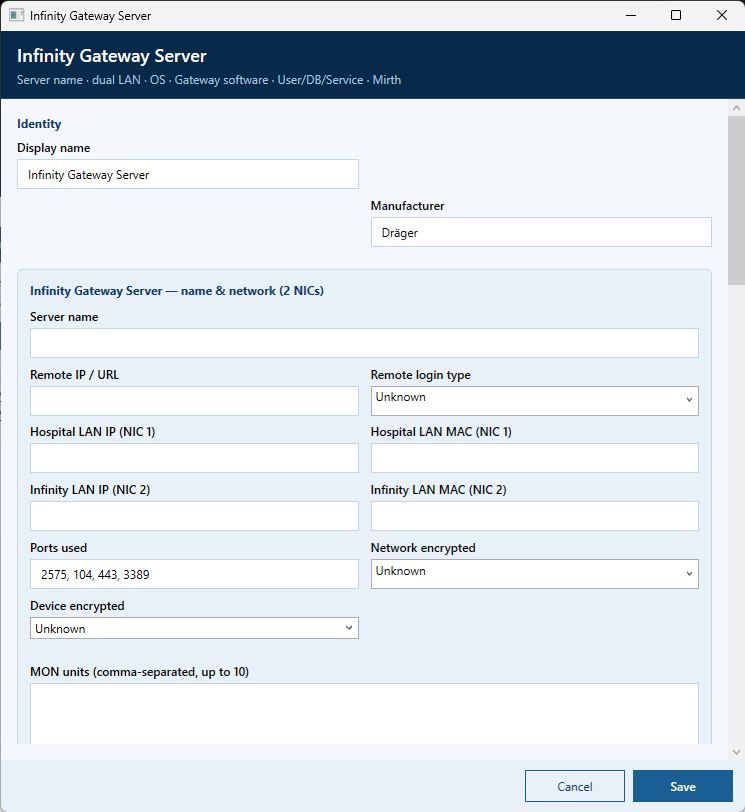
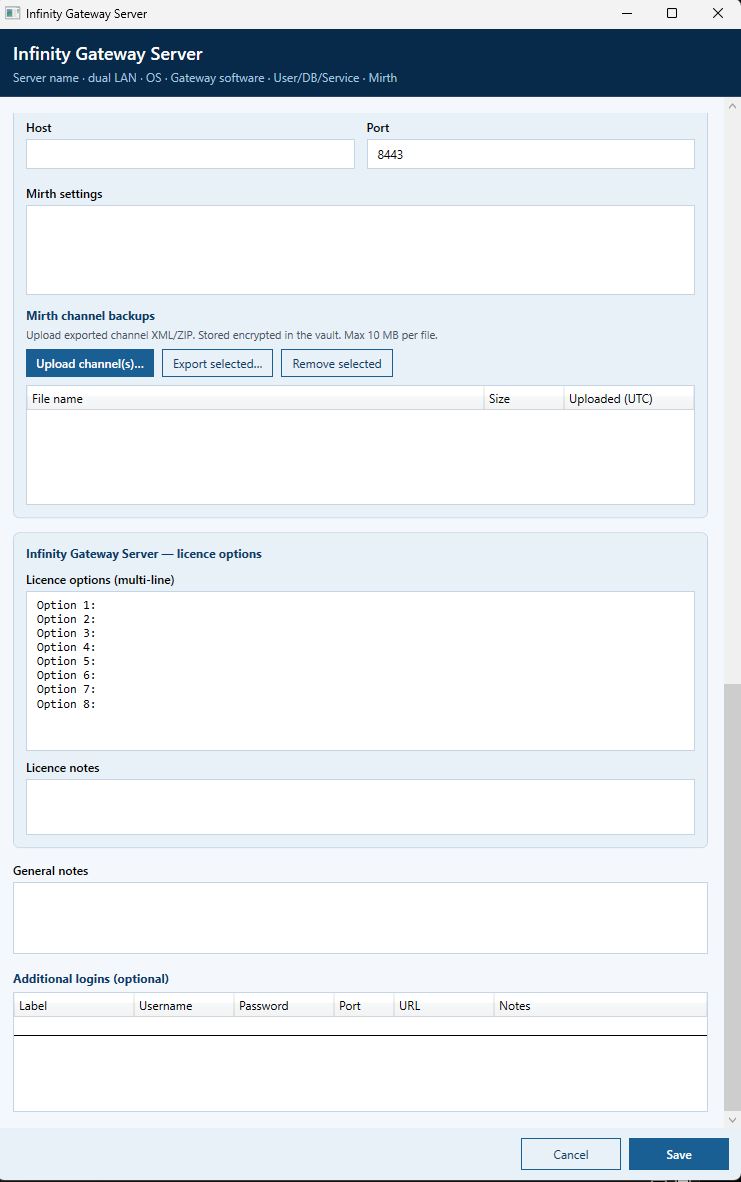
Dual NIC: Hospital LAN and Infinity LAN (IP/MAC), remote IP/URL and login type, MON units, accounts, Mirth channel backups stored encrypted in the vault, licence notes.
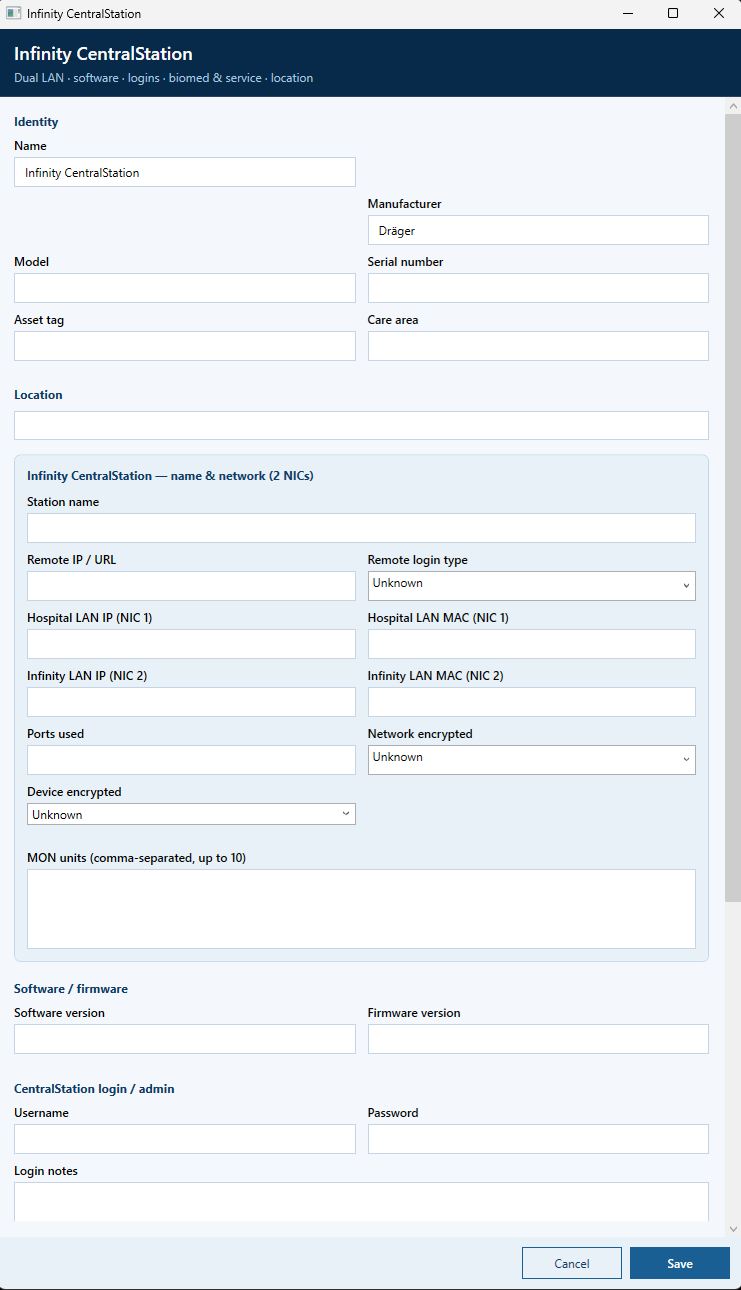
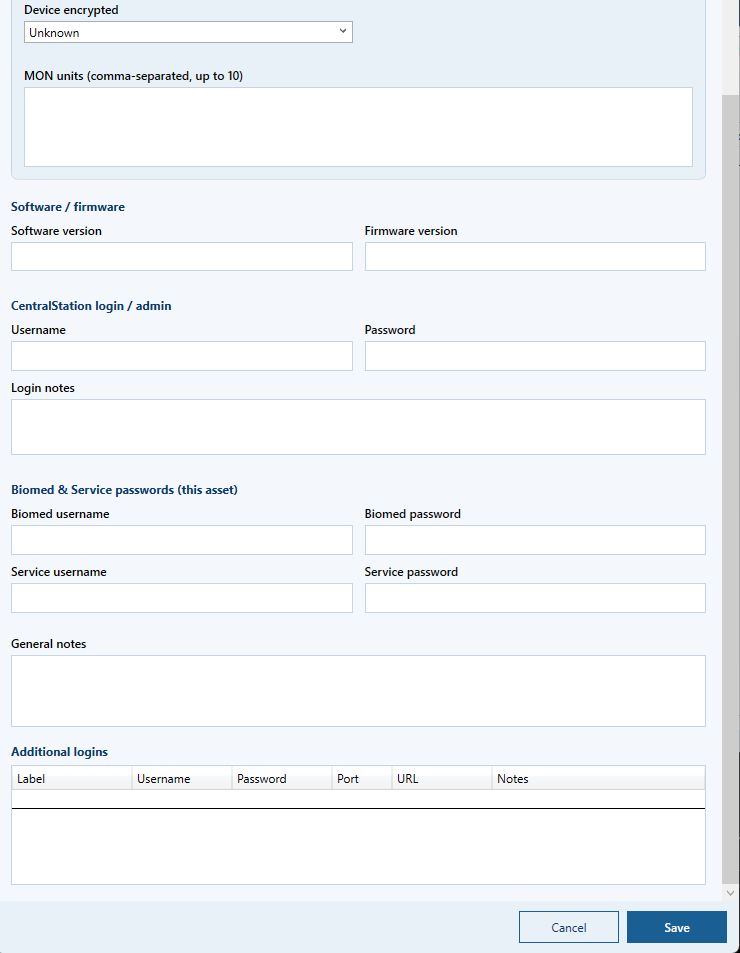
Station identity, dual adapters labelled NIC 1 and NIC 2 (IP/MAC), software/firmware, location, admin and Biomed/Service credentials.
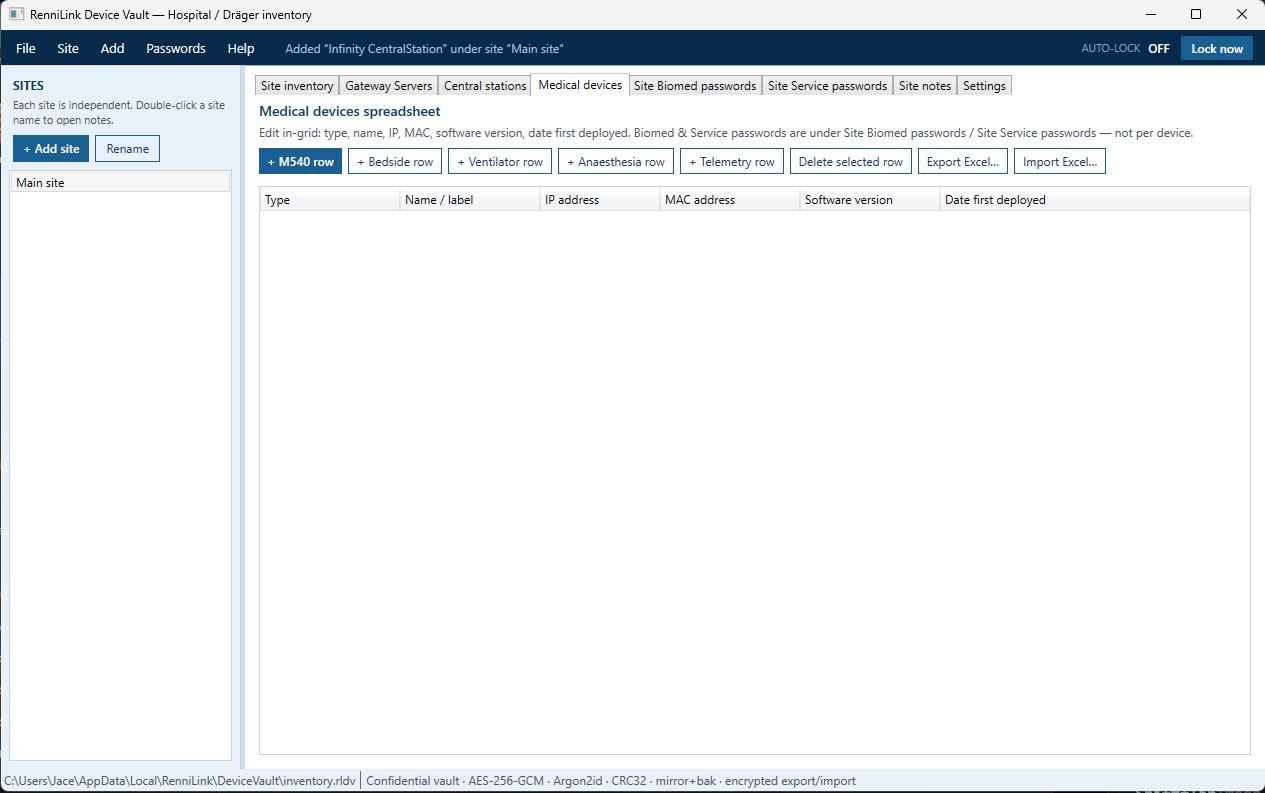
In-grid inventory for monitors, bedside, ventilators, anaesthesia, telemetry, and more — type, name, IP, MAC, software version, date first deployed. Scales to thousands of rows with virtualized grids.
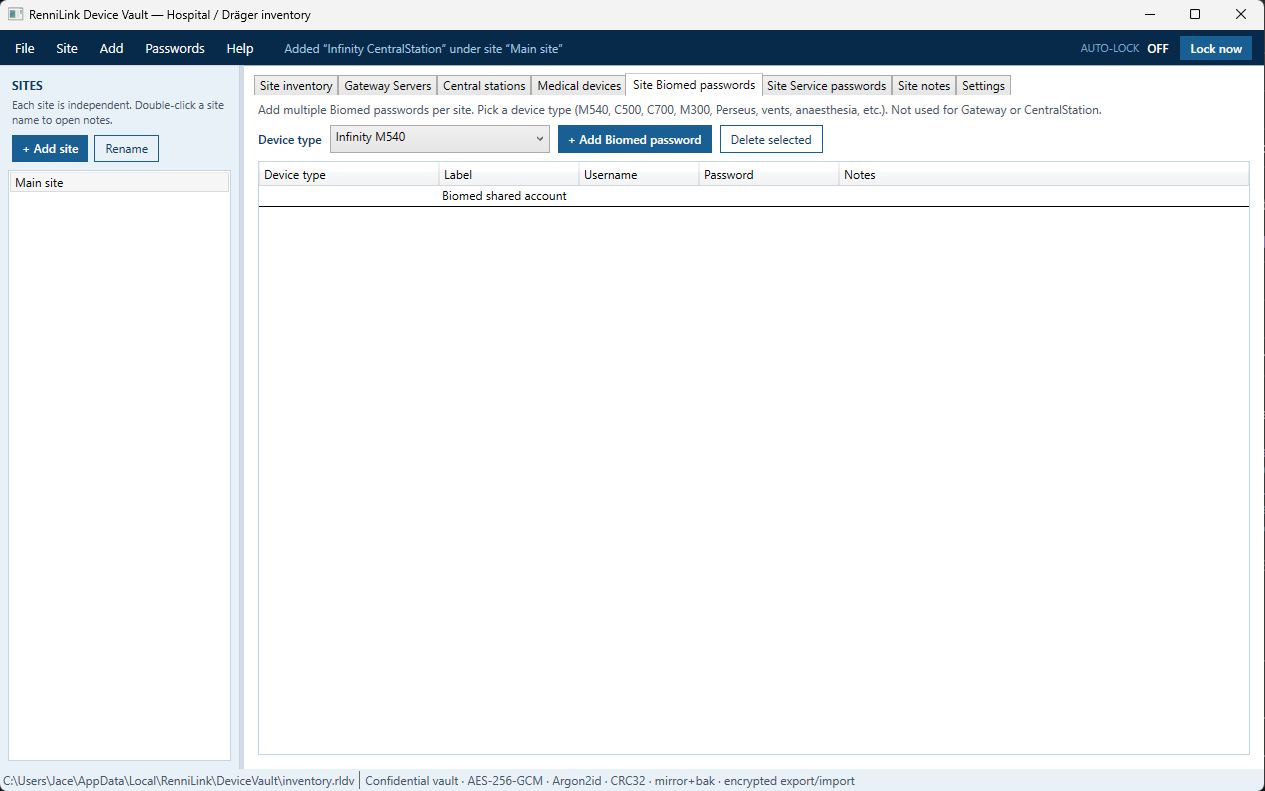
Multiple password entries keyed by device type (M540, C500, C700, Perseus, Evita, and more) — kept separate from the device grid so credentials are not duplicated on every row.
Full-vault encrypted .rldv export for backup or another PC
(transfer password required). Device-list Excel/CSV for network sharing —
type, IP, MAC, software only (passwords never written).
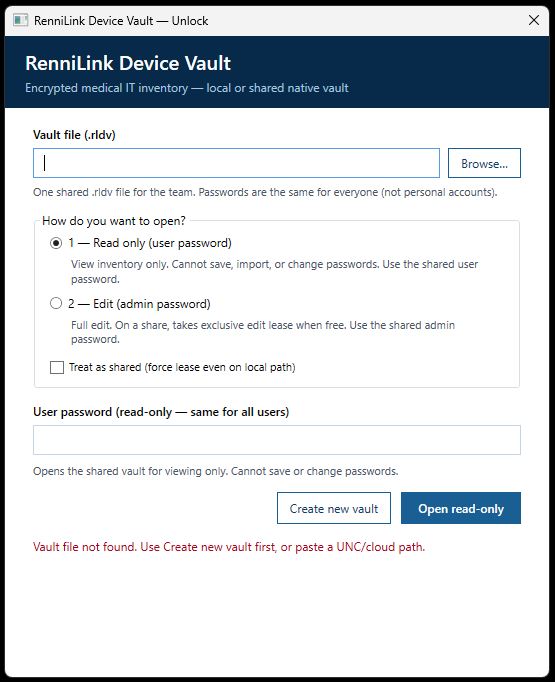
Two shared passwords on one encrypted vault — same for the whole team (not personal accounts). User password opens read-only; admin password opens for edit. See dual passwords.
Place one encrypted native .rldv on a Windows/SMB file share
or a cloud-synced folder. About ~30 users can open the same vault.
Exclusive edit lease — one writer at a time. No SQL Server required.
Silent Intune / SCCM install under SYSTEM, HKLM detection, self-contained package — no separate .NET runtime. See Enterprise.
Two shared passwords on one encrypted vault. Passwords are uniform for all users of that vault file — not personal logins.
| Mode | Password | Capability |
|---|---|---|
| Open read-only | Shared user password | View inventory only; cannot save, import, or change passwords |
| Open for edit | Shared admin password | Full edit; on a share, takes exclusive edit lease when free |
Not per-user accounts. Everyone who opens the vault uses the shared admin password (edit) or the shared user password (view). Ideal for a department inventory file.
Only admin with edit access can change passwords. Must enter both old passwords before setting both new passwords. Admin and user passwords must be different.
Changing passwords rewrites the same shared .rldv
so the whole team uses the new admin/user pair.
Minimum 12 characters each; 16+ recommended for confidential inventories.
Vault files use AES-256-GCM and Argon2id. Dual shared passwords: admin for edit, user for read-only. Integrity layers include GCM tags, CRC-32, SHA-256 fingerprints, and post-save verification. Menu: File → Verify crypto integrity…
| Layer | What it does |
|---|---|
| AES-256-GCM | Authenticated encryption (AEAD) — confidentiality and cryptographic integrity of the vault contents |
| GCM authentication tag | Detects wrong password or tampering with ciphertext |
| AAD (header binding) | Magic, version, and salt bound into GCM — header swaps fail decrypt |
| Argon2id | Memory-hard key derivation from password (password never stored); 256 MB, 4 iterations, parallelism 4 |
| Dual wraps (V2) | Admin and user passwords wrap the same data key — role (edit vs read-only) comes from which password opens the vault |
| CRC-32 trailer | Fast detection of disk / USB / transfer corruption on every vault file |
| SHA-256 fingerprint | Hash of the encrypted body — compare copies without revealing secrets |
| Post-write verify | After every save: CRC check and full AES-GCM decrypt round-trip |
Mirror + .bak |
Automatic encrypted twin + previous-generation backup |
| Export / import | Same encryption + CRC; corrupt imports refused |
Optional idle auto-lock clears the unlocked session from memory. Manual lock clears the in-memory vault.
File → Verify crypto integrity… checks structure, CRC-32, SHA-256 fingerprint; optional password re-entry verifies AES-256-GCM AEAD.
Minimum 12 characters each for admin and user (16+ recommended). Passwords are never stored as recoverable plaintext.
Medical device inventory stays checkable and recoverable after crashes, bad writes, or damaged copies — with verified saves and encrypted backups.
After encryption, a CRC-32 trailer covers the encrypted payload. Truncated or bit-rotted files fail the check. If a CRC is present and wrong, open is refused.
Write temp → flush → replace primary. Then re-read CRC and full cryptographic re-verification. A save only succeeds when disk integrity checks out.
On a successful save: identical encrypted payload to .rldv.mirror.
Before overwrite: previous good primary as .rldv.bak.
Open recovery: primary → mirror → .bak.
File → Export vault for another PC… creates a full encrypted
.rldv (all sites, devices, passwords, channel backups) with a transfer password.
Same AES-256-GCM + Argon2id + CRC class as the live vault.
Import pre-checks CRC; corrupt files are blocked. Replace the whole database or merge sites. Unlock on another PC with the transfer password — not machine-locked.
Excel/CSV export of medical devices: type, IP, MAC, software version only —
passwords never written. Full disaster recovery = encrypted .rldv.
Self-contained Windows installer deploys silently under Intune or Configuration Manager (SYSTEM context) with HKLM detection — no separate .NET install.
| Item | Detail |
|---|---|
| Silent install | /VERYSILENT /SUPPRESSMSGBOXES /NORESTART |
| Context | Machine-wide / SYSTEM (device context) |
| Detection | HKLM\Software\RenniLink\Device Vault — Version, IntuneReady=1, ConfigMgrReady=1 |
| Runtime prereq | None — self-contained .NET 8 |
| Reboot | Not required |
| Platform | Windows 11 and Windows Server 2022 or newer (x64) |
Fair comparison with local password vaults such as KeePass / KeePassXC (KDBX). Same modern vault-crypto class when both use strong AEAD + Argon2; different product job and team-share model.
| Topic | RenniLink Device Vault | KeePass / KeePassXC (typical KDBX4) |
|---|---|---|
| What it is | Medical device inventory vault (sites, gateways, stations, devices, service passwords) | General-purpose password manager (logins, notes, attachments, custom fields) |
| Data at rest | AES-256-GCM authenticated encryption (AEAD) over the whole vault | AES-256 or ChaCha20 payload; KDBX4 with modern settings uses strong integrity |
| Key derivation | Argon2id fixed high-memory profile (256 MB, 4 iterations, parallelism 4) | Argon2id (or AES-KDF on older DBs) — user-configurable parameters |
| Open passwords | Dual shared: admin (edit) + user (read-only); same pair for the whole team | One master password (optional key file / hardware second factor) |
| Crypto integrity stack | GCM tag + AAD · dual wraps · CRC-32 · SHA-256 fingerprint · post-save verify · File → Verify crypto integrity… | Database integrity (HMAC / AEAD depending on build); user-managed backups of the .kdbx |
| Disk recovery | Atomic save · .mirror · generation .bak · open recovery path · refuse corrupt import |
Depends on how you copy and back up the database file |
| Team multi-user | One shared native .rldv on SMB / cloud folder · ~30 users · exclusive edit lease · no SQL Server |
Typically one user per file, or external sync; not a built-in exclusive-lease inventory model |
| Backup / transfer | Secure encrypted export/import of full vault with transfer password + CRC | Portable .kdbx; multi-platform clients |
| Safe inventory sharing | Excel/CSV: type, IP, MAC, software only — passwords never written | Designed for credential entries; export can include secrets unless carefully filtered |
| Enterprise deploy | Silent Intune / SCCM · HKLM detection · self-contained (no separate .NET) | Varies by packaging; not a medical inventory install pack |
| Second factor / key file | Shared admin/user passwords + host and share ACLs (no KeePass-style key file / YubiKey path) | Key file, composite key, optional hardware (e.g. YubiKey) widely used |
| Platform | Windows 11 / Server 2022+ (x64), self-contained installer | Multi-platform (KeePass 2 Windows; KeePassXC cross-platform, etc.) |
| Public scrutiny | Purpose-built product; integrity and share model documented for clinical IT | Long public history, many implementations, extensive community review |
With strong passwords, Device Vault’s AES-256-GCM + Argon2id sits in the same modern vault-crypto class as KeePass/KeePassXC with strong KDBX4 + Argon2id settings — authenticated ciphertext and a memory-hard KDF.
Domain model for sites, gateways, stations, device grids, and site Biomed/Service passwords.
Dual shared passwords (admin edit / user view). Multi-layer integrity.
Team share without SQL — shared .rldv + exclusive edit lease.
Intune/SCCM packaging.
Day-to-day personal and IT logins across apps and websites; optional key file / hardware factors; multi-platform clients. Use Device Vault when the asset is medical device inventory + service credentials.
Bottom line: an exercise in secure medical inventory using modern vault crypto (AES-256 AEAD + Argon2id + dual wraps), multi-layer integrity (CRC-32, SHA-256, post-save verify), dual shared passwords, secure encrypted export, and shared native vault multi-user (exclusive lease, no SQL) — specialised for medical device inventory, not a general password manager.
Windows UI for unlock (dual passwords), site inventory, server and station detail, medical devices, and Biomed passwords. Click a shot to enlarge.
No. The native encrypted .rldv file is the store.
No SQL Server, Azure SQL, or database server is required.
User password opens read-only (view only). Admin password opens for edit (and takes the exclusive lease on a share when free). Same two passwords for everyone on that vault — not personal accounts.
Yes. Put one encrypted vault on a Windows/SMB share or cloud-synced folder. About ~30 users can open it; one exclusive edit lease at a time for writers. See Team share.
No. It is lease-based exclusive edit on a shared encrypted file — check-out style, not two people saving independent edits at the same second.
No. Device Vault is an offline inventory and credential vault — not live device discovery or network scanning.
Beyond encryption: AES-GCM authentication tags, dual password wraps, CRC-32 trailers, SHA-256 fingerprints of the encrypted body, and full decrypt verification after saves. See Security.
Use secure export (full encrypted .rldv with a transfer password),
or keep a verified copy of the vault file from its store location.
CRC, mirror, and .bak support recovery — see Resilience.
No. Device-list Excel/CSV is type, IP, MAC, software version only. Full backup = encrypted .rldv.
Yes. Silent switches, SYSTEM context, HKLM detection, self-contained package — see Enterprise.
Windows 11 and Windows Server 2022 or newer (x64). Self-contained installer includes the .NET runtime.
Same modern vault-crypto class (AES-256-GCM + Argon2id) when KeePass uses strong KDBX4 settings. Device Vault adds medical inventory schema, dual shared passwords, multi-layer CRC/SHA-256 integrity, exclusive-lease team share without SQL, and secure full-vault export. See vs KeePass.
No. Strong local encryption needs strong passwords and a trusted PC. Not a substitute for enterprise HSM or domain secrets management for every organisation.
Encrypted vault for hospital and Dräger Infinity medical device inventory — dual shared passwords, team share without SQL, multi-layer crypto integrity, and Intune/SCCM-ready packaging. Presented as an exercise in secure medical inventory and not offered for sale or commercial licensing.